
Hacking UIs
I listen to a lot of music. Like, a LOT. I've tried all the major streaming music services and am quietly building a respectable library in FLAC. I've gravitated toward Spotify because of the algorithm, and stayed.
Yes I know Spotify's CEO isn't spotless. Eventually I plan to exit the platform altogether, once it no longer serves my exploration needs. To that end, I'm integrating Mixarr into my stack of media apps. But until my music discovery is also self-hosted, Spotify remains part of my life.
That said, I have been struggling with the Spotify UI. I'm here for music. Not audiobooks. Not podcasts. Not video. Not whatever new thing they decide to sell. 'Love' is a strong word for what I feel for the dedicated apps I have for those, but love them I do. So I don't need Spotify to be them. There is no default way, unfortunately, to cleanly remove these features from the UI.
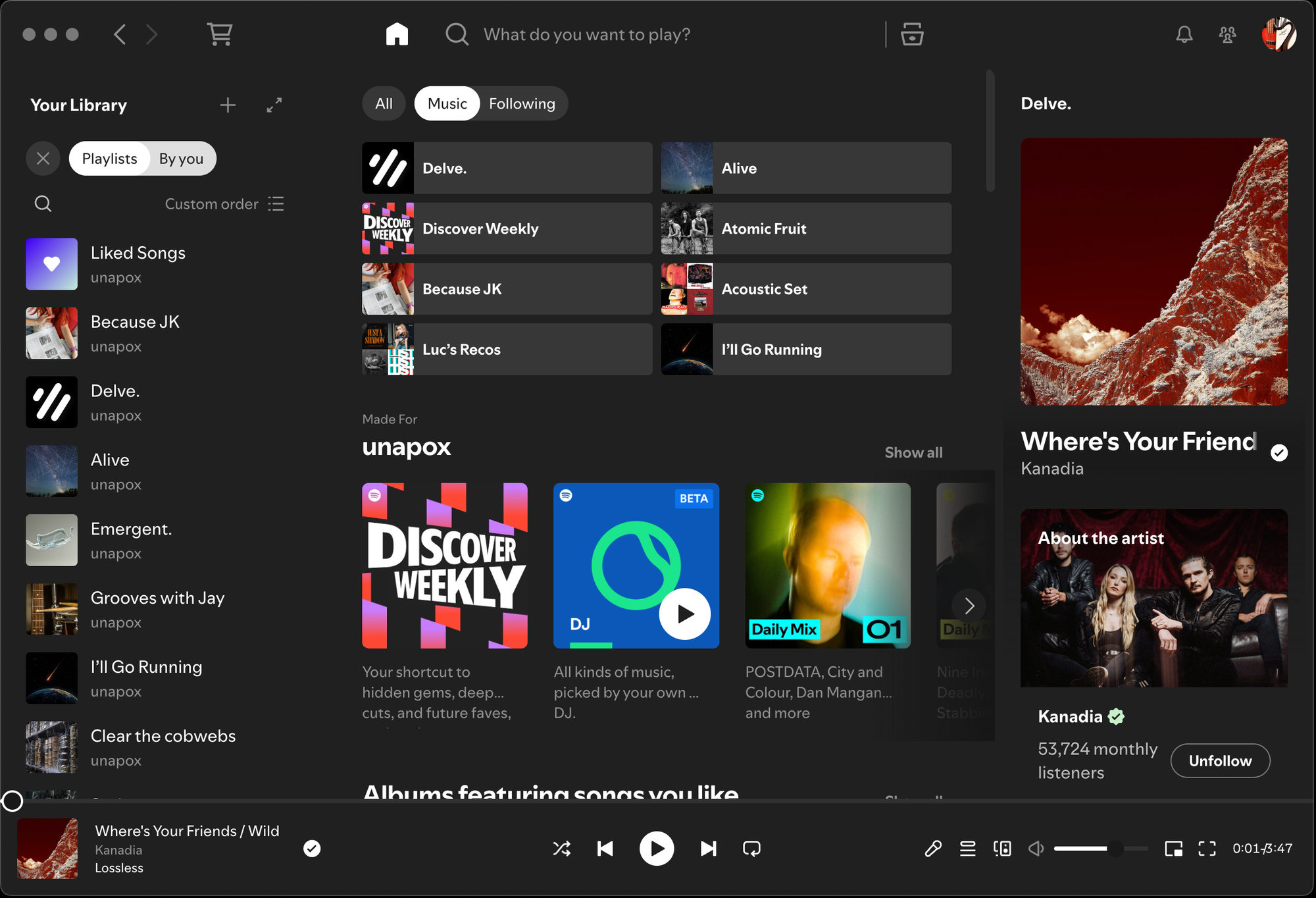
So I thought about dusting off my Swift and building something against the Spotify API, but then I found Spicetify, a command-line tool that makes the Spotify UI configurable. Turns out Spotify's UI is really just a browser – themes, for instance, are html, css, and js. Anyway, with this tool I've been able to disable all the visual junk I don't want and keep the experience focused on music.
Mine looks like this:
Spicetify is a command-line app, so there is some reading required. Also, Spotify is pretty update-happy, so you do have to re-invoke Spicetify from time to time in the terminal. But the QoL improvements are worth it.
This brings me to interface hacking in general. Recently kiddo started using one of our old iPods again, an iPod video I got in 2005. She lives in her airPods so was lamenting the missing connectivity. I looked at adding a bluetooth module and decided the juice wasn't worth the squeeze. Then I found an iPod clone that did everything she wanted, including FLAC playback.
It has a theme-able UI, and a visual theme editor. Themes decompose to JSON and .png images, like this:
{
    "theme_info" : {
        "title"       : "Complete Theme Example",
        "author"      : "Theme Developer",
        "authorUrl"   : "https://example.com",
        "description" : "A fully featured theme with all options"
    },

    "themeCover"       : "cover.png",
    "desktopWallpaper" : "desk_bg001.png",
    "globalWallpaper"  : "global_bg001.png",
    "desktopMask"      : "mask.png",
    "fontFamily"       : "CustomFont.ttf",

     // etc.
}
So for those of us who are non-visual, a text editor will do. Finally a way to show kiddo what I do isn't completely lame.